

If you’re turning wrenches for a living or running diagnostics in the shop every day, you know that not all scan tools are built the same. I’ve gone through my fair share over the years, and nothing tests your patience like an underwhelming scanner in the middle of a busy day. That’s why finding the best professional OBD2 scanner can be a total game changer—it needs to be fast, reliable, packed with features, and, most importantly, accurate.
In this roundup, I’m diving into the scanners I’ve actually used and trust. Whether you’re a tech at a busy garage or an experienced DIYer looking to level up, there’s something here that’ll suit your workflow. From lightning-quick diagnostics to bi-directional control and module coding, I’ve broken down how each one performs in the real world—no fluff, just honest takes. Keep reading to find out which scanner earns a permanent spot in your toolbox.
Best Professional OBD2 Scanners in 2026
| Image | Model | |
|---|---|---|
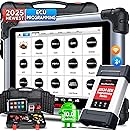 | Best High-End Scanner For Pro Shops Autel MS908S PRO IIEditor's Choice  Check Price | Check Price |
 | Best Bidirectional OBD2 Scanner For Advanced DIY Repairs Innova 5610Check Price | Check Price |
 | Best All-In-One Professional Scanner XTOOL D7 ScannerCheck Price | Check Price |
 | Most Feature-Packed Pro Scanner Autel MK900BTCheck Price | Check Price |
 | Best High-End Scanner TOPDON Phoenix Plus 2Check Price | Check Price |
 | BestScanner With Pro-Level Features ThinkScan 689Check Price | Check Price |
 | Best For Deep Diagnostics Across All Vehicle Types LAUNCH X431 Pro V5.0Check Price | Check Price |
 | Best Budget Professional Scanner OTOFIX D1 LiteCheck Price | Check Price |
What to Look for When Buying a Professional OBD2 Scanner
Look, I’ve been elbow-deep in diagnostic equipment for over fifteen years, and trust me — not all professional scanners are created equal. The biggest mistake I see shops make is buying based on price alone or flashy marketing claims. You need a scanner that can handle the real-world chaos of a busy shop, not just look good on a spec sheet.
The key differentiator between consumer and professional scanners isn’t just the price tag — it’s the depth of diagnostic capabilities and build quality. Professional scanners need to access manufacturer-specific codes, perform bi-directional controls, and handle advanced functions like ECU programming. I learned this the hard way when a supposedly “professional” scanner left me hanging during a complex BMW diagnosis, forcing me to rent equipment just to finish the job.
Coverage and Compatibility Requirements
Vehicle coverage is where the rubber meets the road. Your scanner needs to support not just generic OBD2 protocols, but also manufacturer-specific systems that comply with SAE J1979 standards. This means full access to enhanced diagnostic trouble codes, live data parameters, and system-specific functions that generic scanners simply can’t touch.
Don’t get caught up in marketing claims about “supporting all vehicles.” What you really need is current, regularly updated software that covers the vehicles you actually work on. I’ve seen too many shops get burned by scanners that technically support a vehicle but can’t access the specific modules or perform the functions needed for modern repairs. Make sure your scanner can handle both domestic and import vehicles if that’s what rolls into your bay.
Essential Professional Functions
Bi-directional control capability is non-negotiable for professional use. You need to be able to command components, run actuator tests, and perform system calibrations — not just read codes like a basic scanner. This includes everything from cycling ABS pumps to commanding fuel injectors and running transmission adaptation procedures.
Live data streaming and graphing capabilities separate the pros from the toys. When you’re chasing an intermittent misfire or diagnosing a complex drivability issue, you need to see multiple parameters simultaneously and record data for analysis. The scanner should handle at least 4-6 data streams smoothly without lagging, because nothing kills diagnostic efficiency like waiting for your equipment to catch up.
Advanced Diagnostic Features
- ECU coding and programming capabilities
- Key programming and immobilizer functions
- ADAS calibration support for newer vehicles
- Network topology mapping for CAN bus diagnosis
Build Quality and Durability Standards
Professional scanners take a beating in shop environments, so build quality isn’t just about looks — it’s about uptime. Look for IP65 or better environmental ratings, reinforced cables, and shock-resistant housings. I’ve dropped scanners, spilled coffee on them, and watched them survive engine bay heat that would kill consumer electronics.
The display and interface matter more than you might think when you’re using the scanner for hours every day. A bright, readable screen that works in direct sunlight and responds quickly to touch inputs will save your sanity during long diagnostic sessions. Battery life should be at least 8 hours of continuous use — because nothing’s worse than your scanner dying in the middle of a complex procedure.
1. Autel MaxiSYS MS908S PRO II Scanner
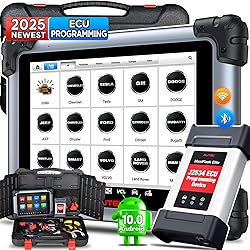
If you’re working in a high-volume professional automotive shop and you’re tired of bouncing between scanners and laptops to handle diagnostics, programming, and advanced trouble-shooting—this is the tool that’ll stop all that nonsense. The Autel MaxiSYS MS908S PRO II comes locked and loaded with serious hardware muscle and equally robust software capabilities. I’m talking about lightning-fast startup, full-system diagnostics, and the ability to dig deep into high-end vehicles like Teslas and McLarens. This unit isn’t just another scanner—it’s an automotive powerhouse.
What really won me over was the speed and interface. The octa-core processor and Android 10 platform make navigation seamless, and the AutoScan 2.0 feature scans vehicles at record pace. Plus, it feels great in use—solid carry case, built-in camera for easy VIN scanning, and every function you’d want from ECU programming to active testing. If you’re serious about maximizing shop efficiency and taking on trickier repairs without always turning to OE software, this scanner easily fits the bill.
One thing to note: while this tool is packed with pro-grade features, it assumes you’re somewhat familiar with advanced diagnostics. It’s not the scanner for someone new to automotive repair unless you’re ready to climb the learning curve. And while I wish the 1-year update plan was longer, the value here is hard to argue with—especially for shop owners looking to future-proof their toolkit.
Pros:
- Blazing fast performance with octa-core power and Android interface
- Supports nearly all vehicles, including exotic brands
- Full bi-directional control and advanced ECU programming
- AutoScan 2.0 drastically reduces diagnostic time
Cons:
- Only includes one year of software updates
- May be overkill for beginners or very small shops
2. Innova 5610 Bidirectional Scan Tool

Out of all the pro-level OBD2 scan tools I’ve had my hands on, the Innova 5610 stands out as a sharp tool for serious DIYers and professionals alike. I’ve used it on everything from early-2000s sedans to newer trucks, and it’s never flinched at pulling up codes from modules buried deep in a modern vehicle’s system.
What’s nice about the 5610 is that it toes the sweet spot between basic code readers and the wallet-busting professional tools that require subscriptions. Its bidirectional control features are legit—you can command your car’s systems directly, like activating a fuel pump or testing an A/C compressor clutch, which is a game changer when there’s no DTC but something still feels “off.” It also adapts its capabilities based on the vehicle you’re scanning, loading specific manufacturer modules to expand data coverage like nothing else in its price range.
Its real-time data capabilities, OEM-level access, and the ability to pair with a Bluetooth app make the Innova 5610 a solid choice for diagnosing beyond the basics. Just keep in mind, it’s not always plug-and-play across every make and model—and the lack of key backlighting can slow you down in dim garages. Still, for the functionality it offers (without any recurring fees), this scanner pulls more weight than you’d expect.
Pros:
- True bidirectional control for component testing
- OEM-level data access across multiple modules
- Bluetooth app integration with lifetime updates
- Works as a standalone unit, no need to always connect to a phone
Cons:
- No backlit buttons—annoying in low light
- Vehicle coverage varies—always best to check compatibility first
3. XTOOL D7 Bidirectional Scanner

This is one of those tools that really makes you feel like you’ve leveled up in your wrench-turning journey. The XTOOL D7 doesn’t just read codes — it dives deep. We’re talking full bidirectional control, ECU coding for Euro cars like BMW and Benz, and access to over 30 critical service functions. It felt like I was using something out of a professional dealership — but without the five-figure price tag.
The user interface is clean and intuitive, and I was able to perform active tests across multiple systems with ease. I really appreciated being able to send commands and watch real-time sensor responses. Whether you’re validating a faulty fan clutch or running an ABS bleed, the feedback loop is solid. One feature I didn’t expect but found very handy? The ability to personalize diagnostic reports with shop branding. That’s a big plus if you’re running a business or trying to impress clients.
The only thing that held me back from calling it perfect is the software update model. You get three years of updates included, which is generous, but after that, you’ll likely need to pay to keep it current. It would be nice if it came with lifetime updates, especially for those of us who aren’t scanning cars daily. Still, considering the D7 can replace multiple tools and perform dealership-level functions on dozens of vehicle makes, it’s easy to call this scanner a strong, smart investment.
Pros:
- Full bidirectional control for advanced diagnostics
- ECU coding support for major European brands
- 36+ reset and maintenance features
- Wide vehicle coverage with updated protocols like CAN FD and DoIP
- Clean UI and multi-graph data display enhance usability
Cons:
- Software updates only free for three years
- Some functions limited by vehicle make/model
4. Autel MaxiCOM MK900BT Professional Diagnostic Tool

If you want a pro-grade scanner that doesn’t require dropping multiple grand (looking at you, Snap-On), the Autel MaxiCOM MK900BT is a no-brainer. I picked this one up after my trusty old MK808 started glitching, and… wow. The MK900BT took everything I liked about the older model and turned the dial up to 11—with bidirectional controls, 40+ service functions, full system scans, and support for newer protocols like CAN-FD and DoIP. It’s landed firmly in my top tools list, and that’s not hyperbole.
Setup was a breeze, and I had it linked to my first vehicle in minutes. The 8-inch screen is a nice upgrade—clean, bright, and big enough to actually read live data comfortably. I ran it on vehicles ranging from a 1998 Toyota to a 2019 GM, and the coverage has been on point so far. The active test functions are extensive—I’m talking radiator fans, injector cycling, AC clutch tests, even window regulators, depending on the car. Plus, the wireless range is great. I can step away from the driver seat without being tethered by a cable, which is a small thing until it’s not.
Now, it’s not perfect. It takes a minute to boot and sync when it’s cold, and not every advanced function is supported on every car (which Autel is really clear about, to their credit). But that’s the reality with pretty much every scan tool unless you’re paying for OE-level access. And honestly, the update fee here feels pretty modest next to the subscription hits from higher-end competitors.
Pros:
- Massive jump in active test capabilities—3000+ tests is a gamechanger
- Supports modern protocols like CAN-FD and DoIP
- Very competitive price for a top-tier tool
- Strong customer support from Autel
Cons:
- Some reset and immobilizer functions are hit or miss depending on model
- Initial setup and update can take some time
5. TOPDON Phoenix Plus 2 Professional Scanner

If you’re serious about diagnostics and want a shop-grade tool without shelling out five grand, the TOPDON Phoenix Plus 2 might just be your new best friend. I was impressed with how quickly this scanner booted up, connected to a car, and just got to work. The UI is intuitive, the screen is a generous size, and the battery life is pretty stellar. That’s not something I say lightly when talking about diagnostic gear.
This scanner isn’t shy when it comes to features, either. Full-system scanning? Check. Bi-directional control? Big check. I could cycle solenoids and run component tests without breaking a sweat. It handled ECU coding with surprising finesse—especially on European vehicles like BMW and VAG models. And the inclusion of AutoAuth support for newer FCA vehicles is a definite plus, saving loads of time versus dealing with bypass cables. However, don’t expect full J2534 programming—that’s outside this tool’s wheelhouse.
If you’re looking for serious diagnostic coverage across a wide variety of brands and aren’t ready to dive into the world of OEM-specific software subscriptions or passthrough VCIs, the Phoenix Plus 2 hits a sweet spot. It’s powerful, durable, and while not flawless, it punches well above its weight.
Pros:
- Extensive bi-directional control and active testing features
- Excellent coverage across global brands, including FCA AutoAuth support
- Fast performance with good battery life and easy-to-use interface
- Includes 2 years of free updates
Cons:
- Limited support for module programming in U.S. models
- ECU coding support can be hit-or-miss depending on vehicle brand
6. Thinkcar ThinkScan 689 Bidirectional Scanner

If you’re moving up from basic scan tools and need something with serious professional chops, the Thinkcar ThinkScan 689 is worth a long look. It’s a true step into the big leagues with bidirectional control, ECU coding, and all-system diagnostics packed into a lightweight, easy-to-navigate tablet interface. I appreciated the depth of what this scanner could do—it covered nearly every function I threw at it, from active tests to key programming. And for me, that makes it more than a handy diagnostic gadget—it’s a time-saving, problem-solving ally in the garage.
The touchscreen is nicely responsive (most of the time), and having WiFi for updates and built-in Chrome for fast code lookups? That’s just smart design. I did hit a few quirks along the way—like inconsistent auto VIN detection on a couple of older cars, and limited function support on some 10th-gen Civics. But overall, the functionality feels seriously robust for the price point, especially considering the lifetime free updates. Just a heads-up though: if you’re dealing with FCA vehicles, you’ll still need an AutoAuth subscription. But honestly, the ThinkScan 689 pulls off a pretty impressive balancing act between affordability, depth, and usability.
Pros:
- Full bidirectional control and ECU coding capabilities
- Lifetime free updates via WiFi
- Built-in browser and email reporting save time
- Rich functions for both newer and older vehicles
- Solid build with carrying case and steering wheel hanger
Cons:
- May lack full support for some older vehicle protocols
- Touchscreen corners can be a little unresponsive
7. LAUNCH X431 Pro V5.0 Elite

If you’ve ever needed to run a complex diagnostic on a 2012 Prius one day and then reprogram a control module on a 2020 Silverado the next, you know that scanner capability matters — and that’s where the LAUNCH X431 Pro V5.0 Elite steps in like a pro-level Swiss Army knife. This scanner doesn’t just dabble in bi-directional controls, it goes full throttle, with over 100 advanced functions and a wide array of vehicle compatibility dating back to the pre-OBDII days. Yes — it even includes the adapters, which feels like finding bonus fries at the bottom of the bag.
What impressed me most was the sheer speed and stability. It’s packed with a 4-core 2.0GHz CPU, dual-band WiFi, and a responsive tablet interface that’s basically designed to keep you productive rather than lost in menus. From ECU programming to special functions like cylinder balance and hybrid battery checks, this tool goes way beyond just reading error codes. It’s equally at home with heavy-duty diesel trucks and Euro sedans, thanks to support for advanced protocols like CAN FD and DoIP. If your job involves frequent repairs on a wide variety of vehicles, this scanner is easily one of the smartest investments you can make.
That said, it’s not perfect. Setup can be a bit tedious, especially with updates and initial configurations. And it’s not the cheapest tool on the shelf, especially once deals are gone. But considering the features and breadth it offers, it feels like money well spent. The X431 Pro V5.0 is a serious tool for serious diagnostics. Honestly, if you’re already elbows-deep in diagnostics every week, this tool will meet you at your level — and push you to the next.
Pros:
- Extremely wide vehicle and protocol coverage, including older OBD1 vehicles
- Powerful bidirectional controls and over 100 advanced service functions
- Fast performance with modern hardware and responsive interface
- Includes extra adapters and 2 years of free updates
Cons:
- Initial setup and updates take some patience
- Higher price point compared to simpler scanners
8. OTOFIX D1 Lite Advanced Scanner

I’ll be honest—when I first picked up the OTOFIX D1 Lite, I wasn’t expecting much more than the usual mid-tier scanner experience. But I was genuinely impressed. Right out of the box, it felt thoughtfully built: solid, compact, and ready to hustle. It quickly became my go-to tool for mobile diagnostics and quick turnarounds. The Android platform, crisp screen, and snappy interface make it easy to navigate even when you’ve got greasy fingers and a tight deadline.
Its bi-directional control is hands-down the feature that makes it a standout in this price range. I tested it on a stubborn ABS issue and it went toe-to-toe with scanners that cost much more. Paired with 38+ service functions like injector coding and throttle matching, it gives serious bang for the buck. That said, it’s not flawless. The lack of a rear kickstand is annoying when you’re working on the floor, and the initial vehicle detection didn’t always go as smoothly as I’d like. But overall? It’s like having 80% of a high-end scanner at 30% of the cost. Worth it.
Pros:
- Excellent value with pro-grade features like bi-directional control
- Broad vehicle compatibility and great update support
- Clear interface with good speed for its class
- Lightweight and portable without sacrificing functionality
Cons:
- Auto VIN detection doesn’t always work flawlessly
- No built-in kickstand, which would’ve been helpful during intensive jobs
Software Updates and Technical Support
This is where many scanner purchases go wrong. Regular software updates aren’t optional — they’re essential for staying current with new vehicle releases and diagnostic procedures. The automotive industry moves fast, and a scanner that’s not updated regularly becomes obsolete equipment taking up shelf space.
Technical support quality varies wildly between manufacturers. You want a company that provides actual technical assistance, not just basic troubleshooting scripts. I’ve had great experiences with manufacturers who employ actual automotive technicians in their support departments — they understand the real-world challenges we face and can provide meaningful help when you’re stuck on a difficult diagnosis.
Compliance and Professional Standards
Professional scanners must meet specific regulatory requirements, particularly for emissions-related diagnostics. Equipment used for official inspections or emissions testing must comply with EPA standards and NHTSA regulations. This is especially critical if you’re doing state inspection work or dealing with commercial vehicles under FMCSA requirements.
Some states, particularly California with their CARB OBD program, have additional requirements for professional diagnostic equipment. If you’re working on fleet vehicles or doing emissions-related repairs, make sure your scanner meets all applicable regulatory standards — because failing an audit due to non-compliant equipment is a headache you don’t want.