

The adapter is the cheap part. That’s the thing I wish someone had told me before I bought my first Bluetooth OBD2 scanner — because I spent an hour convinced the dongle was faulty when the actual problem was that I’d paired it in my phone’s Bluetooth settings, which is precisely what you’re not supposed to do with that particular model.
A Bluetooth scanner isn’t one product. It’s three: the adapter in your OBD2 port, the app on your phone, and the phone itself. That’s why the best Bluetooth OBD2 scanner for your neighbour might be a bad buy for you — same car park, same check engine light, different phone and different software. Get the combination right and you have a diagnostic tool that outperforms handhelds costing three times as much, on a screen you can actually read. Get it wrong and you have a $40 paperweight and a one-star review to write. Most of the angry reviews in this category are people who bought perfectly good hardware and paired it with the wrong software, or with an iPhone that was never going to talk to it.
So this roundup is organised around that reality rather than around spec sheets. For each adapter below I’ve covered what it connects to, what software it runs, and what you’re locked into afterwards — because that’s what determines whether the thing ends up in your glovebox or your drawer. Some of these are sealed systems where the app comes in the box and there’s nothing to decide. Others are blank adapters that do nothing at all until you choose an app, and are far more powerful for it. Neither approach is better; they suit different people, and knowing which one you are before you spend money is most of the battle.
Best Bluetooth OBD2 Scanners in 2026
| Image | Model | |
|---|---|---|
 | Best All-In-One Bluetooth OBD2 Scanner BlueDriver ProEditor's Choice  Check Price | Check Price |
 | Best Bluetooth Scanner for Enthusiasts OBDLink MX+Check Price | Check Price |
 | Best Bidirectional Scanner, No Subscription XTOOL A30DCheck Price | Check Price |
 | Best Bluetooth Scanner For App Versatility Veepeak BLE+Check Price | Check Price |
 | Best Multi-Platform Bluetooth Scanner Vgate MC+Check Price | Check Price |
 | Most Reset Functions in a Dongle ThinkDiag BluetoothCheck Price | Check Price |
 | Best for BMW and Motorcycle Diagnostics UniCarScan UCSI-2100Check Price | Check Price |
How to Choose a Bluetooth OBD2 Scanner
Here’s the thing nobody tells you before you buy one of these: you’re not buying a scanner. You’re buying a three-part system — the adapter, the app, and the phone in your pocket. Get any one of those three wrong and the other two don’t matter. I’ve watched a $110 adapter get returned as “broken” when the only problem was that the owner had an iPhone and the app he’d downloaded was Android-only.
That’s why this guide is built differently from a normal scanner buying guide. Screen size, button layout, cable quality — none of that applies here, because there is no screen and no cable. What matters instead is whether the thing will actually talk to your phone, what software you’ll be running, and whether it’s safe to leave hanging out of your dash for the next three years. (If you’re not yet sure a wireless adapter is what you want at all, my roundup of the best OBD2 scanners covers handhelds and budget code readers alongside these — and if you work on cars daily and need bidirectional control as part of a normal working day, a dongle is the wrong shape of tool entirely, so start with the best professional OBD2 scanners instead.)
BLE vs Classic Bluetooth: The Trap That Catches iPhone Owners
This is the single most common reason people return these adapters, so let’s get it out of the way first. Not all Bluetooth is the same Bluetooth, and Apple is much pickier than Android about which kind it will talk to.
There are two flavours in this category. Classic Bluetooth (3.0 and earlier) is the old standard — it’s what most cheap dongles use, and iPhones will not connect to a generic Classic OBD2 adapter at all. Bluetooth Low Energy, or BLE (4.0 and up), is what Apple wants you to use, and it’s also gentler on your car’s battery. That’s why so many adapters have a “+” or “BLE” in the name — it’s the manufacturer telling you “this one works on an iPhone.”
There’s a third route that confuses everybody: a few adapters use Classic Bluetooth but carry Apple’s MFi certification, which gets them onto iOS anyway. The OBDLink MX+ is the big one here. It works perfectly on an iPhone — but not because it’s BLE.
Why does that matter in practice? Because it flips the connection instructions completely backwards. With a BLE adapter on an iPhone, you must not pair it in your Bluetooth settings — you’ll see it listed there, and tapping it will throw an error. You open the app and connect from inside the app instead. With the MFi-certified MX+, you do the opposite: you pair it in iOS settings like a normal Bluetooth device. Two adapters in this same roundup, two opposite procedures. I’ve lost count of how many one-star reviews are really just somebody following the wrong set of steps.
Here’s how the adapters in this guide break down:
| Adapter | Connection type | iPhone | Android | Windows | How you connect on iPhone |
|---|---|---|---|---|---|
| OBDLink MX+ | Classic Bluetooth, Apple MFi certified | Yes | Yes | Yes | Pair in iOS Bluetooth settings first |
| Veepeak OBDCheck BLE+ | BLE only on iOS; BLE or Classic on Android | Yes | Yes | Yes (also Mac) | Do NOT pair in settings — connect inside the app |
| Vgate vLinker MC+ | BLE on iOS, Classic on Android/Windows | Yes | Yes | Yes | Connect inside the app |
| UniCarScan UCSI-2100 | Bluetooth 4.0 BLE | Yes | Yes | Yes | No pairing needed — and not even possible in settings |
| BlueDriver | Apple/Android certified, own app only. Sensors marked “LE” on the case are BLE | Yes (iOS 13+) | Yes (Android 8+) | No | Sensors marked “LE”: connect inside the app, not in settings |
| XTOOL A30D | Not published; pairs like a Classic device | Yes (iOS 10+) | Yes (Android 9+) | No | Activate the dongle in the app first, then pair in phone Bluetooth settings |
| ThinkDiag | Not published; own app only | Yes, with limits | Yes — the stronger platform here | No | Activate with serial and code in the app, then connect |
And it isn’t only across brands. Some BlueDriver sensors have LE engraved on the housing, and BlueDriver’s own support documentation is explicit about what that means: those units pair from inside the app, not from your phone’s Bluetooth menu. Ignition on, plug the sensor in, open the app, and it’ll detect the sensor within about twenty seconds and prompt you to pair — you have roughly sixty seconds before it drops out of pairing mode and you have to unplug and replug. So if your sensor is marked LE, any guide telling you to pair it in iOS settings is the wrong guide, whatever else it says. Check the case first.
Watch the model name rather than the brand name, too. Veepeak, for instance, sells both a Mini running Classic Bluetooth and the OBDCheck BLE+ in this roundup — the two look almost identical in a listing thumbnail, but only the BLE version will ever talk to an iPhone. The same applies across the category: within one brand, the “+” or “BLE” suffix is frequently the entire difference between a working adapter and a paperweight.
Android owners have it easier, and can often skip pairing altogether — with apps like Car Scanner you just select Bluetooth LE inside the app and connect, no PIN required. If an app does insist on pairing and it won’t take, the fix is almost always turning Bluetooth off and back on, or disconnecting whatever else your phone is already talking to.
One more iPhone-specific gotcha worth knowing before you start swearing at your car: if you’re coding a BMW, the apps will ask you to put the phone in airplane mode, turn Wi-Fi off, disable CarPlay, and disconnect your phone from the car’s own infotainment system first. Your iPhone can only hold so many Bluetooth conversations at once, and your car is already one of them.
The App Decides What You Actually Get
Two adapters with identical hardware specs can deliver wildly different results, because the adapter is just a radio — the app is what actually knows how to interrogate your car. This is where most buyers get it backwards. They compare chipsets and Bluetooth versions, then download whatever free app comes up first and wonder why they’re only seeing engine codes.
There are two camps, and picking the right camp matters more than picking the right adapter.
Closed ecosystems come with their own app and only work with that app. BlueDriver, XTOOL and ThinkDiag all work this way. The upside is that there’s nothing to research and nothing to configure — you plug in, open the one app that works, and it does what the box promised. The downside is that you’re stuck with whatever the manufacturer’s software can do, and if you don’t like the interface, tough.
Open adapters ship with no app at all and work with dozens of third-party ones. The OBDLink MX+, Veepeak BLE+, vLinker MC+ and UniCarScan are all in this camp. On its own, an open adapter does nothing — it’s genuinely useless until you choose software. But that’s also the point: the same $40 dongle can be a basic code reader on Monday and a BMW coding tool on Saturday, depending on what you launch.
If you go open, here’s where to start:
- Car Scanner ELM OBD2 — free, well designed, works with almost any ELM327-based adapter. Start here before you spend money on anything else.
- OBD Fusion — the paid step up when you want deeper parameter access and better logging.
- Torque Pro — Android only, the classic choice for custom dashboards and gauges.
- FORScan — Ford, Lincoln, Mercury and Mazda. Needs an adapter that supports MS-CAN, which rules out most budget dongles.
- BimmerCode / BimmerLink — BMW, MINI and Toyota Supra coding. Sold separately, one-time purchase per app.
- JScan — Jeep, Dodge, Chrysler and RAM.
- MotoScan — BMW motorcycles. Android only; there is no iOS version and none planned.
And then there’s the part that catches people out months after purchase: how the software is paid for. Some adapters charge once for hardware and never again. Some include free updates for the life of the tool. Some give you a year of full functionality and then quietly downgrade you to basic code reading unless you renew. Others sell you the hardware cheap and charge per vehicle brand afterwards. All four models are represented in the picks below, and I’ve flagged which is which — read that part before you buy, not after, because the cheapest adapter on day one isn’t always the cheapest one in year three.
1. BlueDriver Bluetooth Pro OBD2 Scanner

BlueDriver is the adapter I hand to people who don’t want to make any decisions. The sensor and the app are locked to each other and sold as one experience — there is nothing to research, no connection type to pick, no third-party software to compare. You plug it in, open the BlueDriver app, and it works. In a category where half the one-star reviews are really just people who downloaded the wrong app, that closed design is a genuine feature rather than a limitation.
The pairing flow is worth understanding before you’re sitting in a cold driveway. If your sensor has LE engraved on the housing, BlueDriver’s support documentation is clear that it pairs from inside the app rather than through your phone’s Bluetooth menu — ignition on, plug the sensor in, open the app, and it detects the sensor within about twenty seconds and asks you to confirm. You get roughly sixty seconds before it drops out of pairing mode and you have to unplug and start again. It’s worth checking the case for that marking, because plenty of walkthroughs online tell you to pair in settings, and for an LE sensor that’s simply the wrong instruction.
The trade-off for that simplicity is that you are buying into a walled garden permanently. This sensor will never run Torque, FORScan, BimmerCode or anything else — the app and sensor are designed to work exclusively with each other. There’s no Windows client either, so if you were hoping to log data on a laptop, look elsewhere in this roundup. And because the repair database lives in the cloud rather than on the dongle, a garage with no signal gets you codes but not the part of the product you actually paid for. Officially you’ll want iOS 13 or Android 8.0 as a minimum, and if you’re running an aftermarket Android head unit, don’t bother — many of those ROMs block BlueDriver from pairing at all.
Pros:
- Zero setup decisions — one app, one sensor, no connection settings to get wrong
- Among the most reliable iPhone pairing in the category
- Buy once — no subscription, no per-brand unlocks, free app updates
- Works equally well on iOS and Android
Cons:
- Locked to its own app forever — no third-party software, ever
- No Windows or Mac support
- Needs a data connection for the repair database to be worth anything
- Won’t pair with many aftermarket Android head units
2. OBDLink MX+ Bluetooth OBD2 Scanner

The MX+ is the opposite philosophy to BlueDriver, and it’s the one adapter here I’d call genuinely future-proof — because it doesn’t decide anything for you. It ships with OBDLink’s own app, but it’s equally happy running Car Scanner, OBD Fusion, Torque, FORScan, BimmerCode or Carista. Buy it once and the same dongle can be a code reader this month and a coding tool next year, purely by changing what you launch.
It’s also the odd one out on iPhone, and this trips people up constantly. Most adapters here use Bluetooth LE, where you must not pair in iOS settings. The MX+ does the opposite — it’s an Apple-certified Classic Bluetooth device, so you pair it in iOS Bluetooth settings first, like a set of headphones. Follow BLE instructions with an MX+ and nothing happens; follow MX+ instructions with a BLE adapter and you get an error. Same category, opposite procedures.
Two things justify the price over a $40 dongle, and neither is about diagnostics. First, it’s built to live in the port — the sleep mode is deliberate engineering rather than a marketing line, and OBDLink states outright that the adapter is designed to stay plugged in continuously without flattening the battery. Second, security: most cheap dongles broadcast their presence constantly and sit behind a four-digit PIN that’s usually still the factory 1234. The MX+ doesn’t advertise itself, requires physical access to connect, and encrypts the link. If something is going to be wired into your car’s data network permanently, that matters more than a spec sheet suggests.
It’s also the only adapter in this roundup that runs on Windows as well as iOS and Android, which makes it the obvious pick if you ever want to log a long drive on a laptop rather than squint at a phone. The one physical gripe: the housing sits a little loose in some OBD2 ports, and on a rough test drive that’s enough to interrupt a logging session. A strip of tape solves it, inelegantly.
Pros:
- Works with almost any OBD2 app on the market — no lock-in
- The only pick here that also runs on Windows
- Designed to be left plugged in permanently
- Proper link encryption instead of a guessable PIN
Cons:
- Pairs the opposite way to BLE adapters on iPhone — easy to get wrong
- Useless out of the box until you choose an app
- Loose fit in some ports can interrupt long logging sessions
- Roughly triple the price of a basic BLE dongle
3. XTOOL A30D Wireless OBD2 Scanner

Most dongles read. This one commands. The A30D sends instructions to your car’s modules from the phone in your hand — cycle a fuel pump, run the wipers, bleed ABS, drop the electronic parking brake for a rear pad job. There are 19 reset and relearn functions on top of full-system diagnostics, and unlike almost everything else with that feature list, there’s no annual fee attached. Software updates are free for the life of the tool.
Setup runs backwards from every other adapter here, so it’s worth knowing in advance. You install the Anyscan app first, then bind and activate the dongle using the serial number printed on the certificate in the box — then you plug it into the port and pair it in your phone’s Bluetooth settings. Do it in the usual order and you’ll be staring at an unactivated device wondering why nothing works. Once it’s running, it holds a connection out to about thirty feet, which is enough to sit in the driver’s seat and watch live data while somebody else works at the front of the car.
Here’s the part nobody mentions in reviews, and it matters more on a phone than it ever would on a handheld: this thing is enormous on disk. The complete set of vehicle packs, special function packs and one language runs to roughly 14 GB, each additional language adds another 2–3 GB, and XTOOL suggests keeping 15–17 GB free. If you’re carrying a 64 GB iPhone with a camera roll on it, that’s not happening. The workaround is straightforward once you know it exists — skip the download-everything prompt, open the upgrade screen, and pull only the packs for the vehicles and functions you actually need.
Two caveats worth pricing in. It’s a closed system: the A30D works through Anyscan and nothing else, so third-party apps aren’t an option no matter how much you’d prefer Car Scanner’s interface. And on 2018-and-newer Chrysler, Dodge, Jeep, Fiat and RAM vehicles with a secure gateway, you’ll hit an authentication wall — either register a paid FCA AutoAuth account (that fee goes to the manufacturer, not XTOOL) or use a 12+8 bypass cable. Every bidirectional tool faces this; it’s just easy to miss until you’re already parked with the hood up.
Pros:
- Genuine bidirectional control and 19 resets from a phone app
- Free lifetime updates — no subscription, unusual at this price
- Full-system access with up to 8 live PIDs graphed at once
- Holds a stable connection at around 30 feet
- Supports CAN FD for newer vehicles
Cons:
- Needs 15–17 GB of free phone storage for the full software set
- Locked to the Anyscan app — no third-party software
- Must be activated in the app before it will pair
- FCA vehicles need a paid AutoAuth account or a bypass cable
4. Veepeak OBDCheck BLE+ Bluetooth Scanner

This is the adapter I’d hand to someone who wants to try three different apps before deciding what they actually need. The Veepeak BLE+ costs about a third of what the OBDLink MX+ does and runs the same broad catalogue of software — Car Scanner, OBD Fusion, Torque, BimmerCode, JScan, Dr. Prius. What you give up for that price is protocol depth: it covers the five standard OBD2 protocols and nothing beyond them, so MS-CAN and SW-CAN are out, which rules out FORScan’s enhanced Ford features and limits AlfaOBD. For most people diagnosing a check engine light on a mainstream car, that ceiling never comes up.
Once plugged into the OBD port, it connects reliably and quickly to both iOS and Android devices via Bluetooth LE. It’s small and discreet, making it ideal for permanent glove box duty. For me, pairing it with Car Scanner Pro opened up a wealth of live data like regen cycles on a Duramax and emissions readiness checks — all things I care about more than just clearing codes. This thing’s smart, not flashy, and that’s what I need in a scan tool.
Now, it’s not going to give you professional-grade ABS/SRS diagnostics unless you’re using the right app on the right car — that’s a limitation, sure, but it’s clearly stated. For standard engine diagnostics and monitoring, it absolutely delivers solid performance for the price.
Pros:
- Works seamlessly with multiple third-party apps
- Stable Bluetooth LE connection on both iOS and Android
- Compact design fits easily in glove compartment
- Supports real-time data streaming and check engine diagnostics
Cons:
- No MS-CAN or SW-CAN — limited with FORScan and AlfaOBD
- Advanced diagnostics depend heavily on specific apps and vehicles
- No app included — budget for a paid one if you want depth
5. Vgate vLinker MC+ Bluetooth OBD2 Scanner

I’ve had my fair share of Bluetooth OBD2 scanners over the years, and the Vgate vLinker MC+ stands out as one of the most approachable and multi-functional options out there. Whether you’re team Android, iOS, or Windows, this scanner has you covered without the headache of pairing woes — assuming you follow the connection instructions properly. The BLE support on iOS is especially slick; you don’t manually pair it, just fire up your app and connect. Neat and frustration-free.
I put this adapter to work with a Jeep and a Mazda, each using different apps (JScan and FORScan, respectively), and it didn’t flinch. The vLinker MC+ supports advanced protocols like MS-CAN and SW-CAN, making it especially appealing if you’re tinkering with Ford or GM network configurations. It’s also fast — noticeably quicker at handling data than the budget readers I’ve tried. And despite its power, it sips battery thanks to its low idle current and sleep mode — great peace of mind if, like me, you sometimes forget to unplug these things.
Setup quirks? One, and it’s a good one to know before you’re sitting in the car swearing at your phone: the MC+ reassigns its BLE address every time it powers up. Reconnecting looks broken if you don’t know that — the adapter your app remembers isn’t there any more. Once you’ve set the app to search rather than reconnect to a saved device, it’s smooth from then on.
Pros:
- Cross-platform support for iOS, Android, and Windows
- Compatible with advanced OEM protocols like SW-CAN and MS-CAN
- Fast data transfer – ideal for apps that demand high throughput
- Low power draw with sleep mode to prevent battery drain
Cons:
- Initial pairing/setup can be confusing due to dynamic BLE addressing
- No companion app included – must choose and configure third-party software
6. ThinkDiag Full-System Bluetooth Scanner
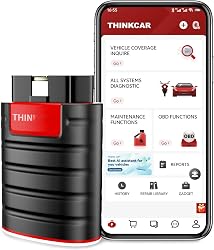
ThinkDiag squeezed a whole lot of professional-grade tech into a small, Bluetooth-enabled device. It turns your smartphone into a legitimately capable diagnostic terminal—something that used to require a four-figure investment in a dedicated scanner. When I plugged this into my OBD2 port and connected it to the ThinkDiag+ app, I was impressed by how deep I could go into live data, sensor monitoring, and bidirectional tests. Engine temp? Got it. TPMS info? All there. I could even monitor catalytic converter efficiency with real-time temp readings. That’s above and beyond for this price range.
The active tests were rock-solid. I toggled components on and off—windows, sunroof, even tested a throttle body. The speed of data retrieval was respectable, and setup wasn’t too painful once I activated the device through the app. Use an Android device if you have the choice. iOS had hiccups in the advanced menus that vanished entirely when I switched to a Samsung tablet — which tracks, since ThinkDiag’s deepest features are documented as needing a current Android device. The other thing to price in: you get a year of full functionality, and when it lapses the resets and bidirectional control go with it. Basic OBD2 scanning keeps working, but that’s not why you bought it.
Pros:
- Full-system diagnostics with bidirectional support
- Factory-level functions at a DIY-friendly price
- Great live data visuals including graphing
- Works well with a wide vehicle range after 1996
Cons:
- Subscription model after first year isn’t very clear or cheap
- iOS compatibility can be hit-or-miss with some features
7. UniCarScan UCSI-2100 BMW Bluetooth Scanner

If your garage features anything with a Bavarian badge—whether it’s a BMW car or motorcycle—the UniCarScan UCSI-2100 is worth a hard look. I tested it primarily with BimmerCode and MotoScan, and it pulled off just about every trick I threw at it. Coding features like disabling seatbelt chimes or activating daytime running lights worked without issue, and on the bike side, I had no trouble resetting service intervals and accessing deeper diagnostics.
What makes it stand out is that it’s officially recommended by both BimmerCode and MotoScan, and it shows. The platform difference is worth spelling out, though. On Android you pair “UniCarScan” in your Bluetooth settings first, then select it in the app. On iOS there’s no pairing at all — it isn’t even possible from the settings menu — you just open the app and connect. And MotoScan, the app that makes this adapter special for bike owners, has no iOS version and none planned. If your garage is a BMW motorcycle and an iPhone, this pairing doesn’t work — you’ll need an Android device for the bike side, whatever you use for the car.
It’s not the cheapest adapter out there—but you’re buying confidence that it’ll just work, especially when it comes to BMW and Mini diagnostics. For me, that peace of mind was worth the price tag.
Pros:
- Officially recommended for BimmerCode and MotoScan
- Supports both cars and motorcycles, especially BMWs
- Stable Bluetooth connection across platforms
- Works with multiple apps beyond just BimmerCode
Cons:
- App licenses sold separately, adding to the cost
- No MotoScan support on iOS
What to Know Before You Leave It Plugged In
The ELM327 Question — And Why the Version Number Lies
Almost every open adapter on the market speaks the ELM327 command set, and there’s a piece of context that changes how you should read those listings: Elm Electronics, the Canadian company that actually made the chip, shut down in June 2022. Genuine ELM327 silicon hasn’t been produced since. Everything sold today is either old stock or a compatible implementation built on a different microcontroller — which isn’t automatically bad, but it does mean the name on the box has become a software standard rather than a guarantee of what’s inside.
For the record, the real firmware versions were v1.0 through v1.4b, then v2.0, v2.1, v2.2 and v2.3, with v2.3 arriving around 2020. So a listing quoting v2.2 or v2.3 isn’t inventing numbers. The problem is that clones report whatever version string the manufacturer typed in. A cheap adapter will happily announce itself as v2.1 while delivering roughly what the original v1.4 could do, and there’s no way to tell from the listing.
Which means the version number is close to useless as a buying signal, and you should judge by behaviour instead. Clones work fine on a 2004 Corolla and fall apart on anything modern. They connect, pull a couple of generic engine codes, then time out or return garbage the moment an app asks for something harder — several simultaneous PIDs, a manufacturer-specific module, a hybrid powertrain, a coding operation. The giveaway is usually speed: a good adapter streams live data smoothly, a clone stutters and drops parameters the moment you graph more than two at once.
Practical rules: buy from a company with a support page, a documented firmware update process and a warranty you could actually claim on. Be suspicious of anything under about $15. And if you’re planning to code rather than just read codes, this stops being about value for money and becomes about risk — a connection that drops halfway through a write can leave a control module in a half-programmed state.
Can You Leave It Plugged In?
This question doesn’t exist for handheld scanners, because you unplug those and put them back in the toolbox. A Bluetooth dongle lives in the port, and the OBD2 port stays powered even when the car is off.
Every adapter draws some current permanently. A good one drops into a sleep mode measured in single-digit milliamps, which your battery will never notice. A bad one sits there broadcasting at full power indefinitely, and if you park the car for three weeks you come back to a click and nothing else. The better manufacturers make a feature of this — OBDLink calls it BatterySaver and says outright that MX+ is designed to be left plugged in continuously.
My rule of thumb: if you drive most days and your battery is healthy, leaving an adapter with a proper sleep mode in the port is fine and genuinely convenient. If the car sits for a week or more at a time, if the battery is already tired, or if the adapter is a no-name unit with no documented sleep current, pull it out. It takes two seconds. Also worth knowing: some adapters use ignition voltage changes to wake up, and that logic doesn’t always work correctly on hybrids and EVs.
Security: A Wireless Device Wired Into Your Car
Worth thirty seconds of thought, because a Bluetooth adapter is a radio permanently connected to your vehicle’s data network. Most budget dongles broadcast their presence constantly and use a four-digit PIN — very often the factory default of 1234, which nobody ever changes. That’s not a reason to panic, but it is a reason to prefer adapters that do it properly.
The better-engineered units address this directly: OBDLink’s adapters don’t continuously advertise themselves and use an encrypted link rather than a guessable PIN. If you’re going to leave something plugged in permanently, that’s a feature worth paying for. And if you sell the car, remember to take the dongle with you — along with whatever trip logs and VIN history the app has been quietly collecting.
What a Bluetooth Scanner Won’t Do
I’d rather you buy the right tool than the one I make the most from, so here’s the honest limit of this whole category. A Bluetooth adapter is only as available as the phone it depends on. Flat phone, cracked screen, glare in the sun, gloves in January, a mate’s car and your phone in the house — every one of those is a diagnostic session that doesn’t happen. A handheld unit with its own screen has none of those failure points.
Most adapters here also can’t command anything. Reading codes is one thing; telling the ABS pump to cycle so you can bleed it is another, and the majority of dongles simply don’t do it. The ones in this roundup that do — the XTOOL A30D and ThinkDiag — are the exceptions rather than the rule, and even they run through a phone screen rather than a purpose-built interface.
If you’re working on cars daily, or you need bidirectional control and module coding as part of a normal working day, a dongle is the wrong shape of tool. That’s a tablet-based scanner’s job — a purpose-built screen, a battery that isn’t also your phone’s battery, and an interface designed for gloved hands rather than touch targets. None of which makes the adapters here worse; it makes them a different tool for a different job. For most people who just want to know what the light means before they call a shop, that job is exactly this one.
If you’re working on cars daily, or you need bidirectional control and module coding as part of a normal working day, a dongle is the wrong shape of tool. That’s a tablet-based scanner’s job — a purpose-built screen, a battery that isn’t also your phone’s battery, and an interface designed for gloved hands rather than touch targets. None of which makes the adapters here worse; it makes them a different tool for a different job. For most people who just want to know what the light means before they call a shop, that job is exactly this one.
Bluetooth OBD2 Scanner FAQ
Do Bluetooth OBD2 scanners work with iPhone?
Some do and some absolutely don’t, and the listing won’t always make it obvious. An iPhone will not connect to a generic Classic Bluetooth adapter — you need either a Bluetooth LE model or one with Apple MFi certification. Every adapter in this roundup works on iOS, but if you’re shopping elsewhere, treat “works with iPhone” in the title as a claim to verify rather than a fact. The connection type in the specifications is what actually decides it.
Do I have to buy an app separately?
It depends which camp the adapter falls into. BlueDriver, XTOOL and ThinkDiag come with their own app at no extra cost, and you can’t use anything else with them. Open adapters like the OBDLink MX+, Veepeak BLE+, vLinker MC+ and UniCarScan ship with nothing, and while there are genuinely good free apps — Car Scanner ELM OBD2 is the usual starting point — the deeper software costs money. BimmerCode, FORScan’s paid tier and OBD Fusion are separate purchases. Budget roughly $10–$30 on top of the hardware if you want more than basic code reading.
Will it work without an internet connection?
The adapter talks to your phone over Bluetooth, so the diagnostic side works fine in an underground car park with no signal. What needs data is anything cloud-based: BlueDriver’s repair report database, software updates, and vehicle pack downloads. So you’ll read and clear codes offline, but you may not get the explanation of what the code means. Worth downloading your vehicle’s software packs at home before a trip rather than discovering the gap on a roadside.
Can I use one with my car’s Android head unit instead of a phone?
Often not, and it’s a common disappointment. Many aftermarket Android stereos run ROMs that lack the Bluetooth profiles these adapters need, and BlueDriver specifically reports that a lot of head units block pairing outright. Veepeak says much the same about Android head units. If that’s your plan, treat it as a gamble and buy somewhere with a decent returns policy.
Can two phones connect to the same adapter?
Not at the same time. These adapters hold one connection, which matters more than it sounds: if your phone is still paired from yesterday and sitting in the house, your partner’s phone won’t connect in the driveway. If a connection refuses to establish for no obvious reason, an already-connected device somewhere nearby is the first thing to check.
Do they work on hybrids and electric vehicles?
Partially, and expectations need managing. Standard OBD2 diagnostics generally work, but the things EV owners actually want — battery state of health, cell balance, charging detail — are manufacturer-specific and only reachable through specialist apps. Dr. Prius for Toyota hybrids and LeafSpy for Nissan are the well-known examples, and both need an adapter that supports them. Some adapters also explicitly exclude EVs from their compatibility statements, so check before assuming.
How far does the Bluetooth reach?
Roughly 10 metres, or about 30 feet, for most of these. In practice that’s enough to sit in the driver’s seat while somebody works at the front of the car, or to watch live data from the passenger seat during a test drive. It is not enough to monitor a car from inside your house.
So Which One Should You Buy?
If you want this decided for you: BlueDriver if you never want to think about software, OBDLink MX+ if you do. That single question separates most buyers, and everything else is refinement.
Beyond that, the picture is fairly clean. The Veepeak BLE+ is the sensible first purchase if you’re not sure how deep you’ll go — it’s cheap enough that outgrowing it isn’t painful. The vLinker MC+ is the one to get if you own a Ford, a Jeep or a GM product and intend to run FORScan or JScan properly, because the extra network support is exactly what those apps need. The XTOOL A30D earns its place if you want to command components rather than just read them, and you’d rather pay once than annually. ThinkDiag goes deeper still on service functions, provided you accept the renewal. And if there’s a BMW or a BMW motorcycle in the garage, UniCarScan is the adapter the coding apps themselves point you towards.
Whatever you land on, check two things before you order: that the connection type matches your phone, and that the app you actually intend to run supports that specific adapter. Those two checks account for most of the frustration in this category — and neither takes more than a minute.