

If you’ve ever seen your check engine light come on and immediately started dreading a trip to the mechanic, you’re not alone. Over the years, I’ve tested a bunch of plug-and-play car diagnostic tools to figure out which ones are actually helpful and not just overpriced blinking boxes. Whether you’re a DIY weekend warrior or just want to stop Googling what P0420 might mean, tracking down the best OBD2 scanner can save you serious time, money, and frustration.
From professional-grade handhelds to Bluetooth scanners that sync with your phone, there’s a wide range out there. But not all of them are worth your cash. In this roundup, I’m breaking down the scanners that stood out during hands-on testing, telling you what worked, what didn’t, and which ones I’d actually recommend keeping in your glovebox. Let’s get under the hood.
Best OBD2 Scanners in 2026
| Image | Model | |
|---|---|---|
 | Best Mid-Range Pro-Level Scanner Innova 5610 Scan ToolEditor's Choice  Check Price | Check Price |
 | Best Bluetooth BlueDriver ProCheck Price | Check Price |
 | Best for DIY Mechanics Innova 5210Check Price | Check Price |
 | Best OBD2 Scanner For Basic Use ANCEL AD310Check Price | Check Price |
 | Best Value FOXWELL NT301Check Price | Check Price |
 | Best for Car Enthusiasts OBDLink MX+Check Price | Check Price |
 | Best Budget OBD2 Code Reader Autel AL319Check Price | Check Price |
- Scanner tells you what’s wrong; a digital torque wrench helps you fix it right.
- Worth keeping a jump starter in the trunk, just in case.
What to Look For in an OBD2 Scanner
Trust me, after fifteen years of wrestling with every type of diagnostic tool from $20 code readers to $3,000 professional units, I’ve learned that the most expensive scanner isn’t always the best choice for your needs. I once had a customer bring in their car with a basic $25 scanner that couldn’t even clear codes properly — turns out it was missing half the diagnostic functions they actually needed. The key is matching the tool to your actual use case, not buying the fanciest gadget on the shelf.
The biggest mistake I see people make is focusing solely on price without considering compatibility and functionality. Your scanner needs to speak the same language as your car’s computer, and some cheaper units only cover basic protocols while missing newer standards. Don’t ask how I know, but spending an hour trying to diagnose a 2018 Honda with a scanner that only supports pre-2008 protocols is not fun.
Compatibility and Vehicle Coverage
Here’s where things get tricky — not all OBD2 scanners are created equal when it comes to vehicle coverage. Most basic scanners handle standard OBD2 protocols just fine, but they’ll leave you hanging when you need manufacturer-specific codes. I learned this the hard way when a customer’s BMW threw a code that my basic scanner read as “transmission malfunction” but my professional unit revealed it was actually a software update issue.
Look for scanners that explicitly list your vehicle make and model year in their compatibility charts. Some manufacturers like Ford, GM, and Chrysler have their own enhanced diagnostic protocols that go way beyond basic OBD2. If you’re working on European cars, make sure the scanner supports their specific systems — trust me, you don’t want to be the guy trying to diagnose an Audi with a scanner that thinks it’s talking to a Chevy.
Essential Features You Actually Need
Let’s cut through the marketing nonsense and talk about features that actually matter in the real world. Live data streaming is absolutely essential — it’s the difference between guessing why your engine is misfiring and actually watching the oxygen sensor readings in real time. I use this feature daily to catch intermittent problems that only show up under specific driving conditions.
Code clearing capability might seem obvious, but some budget scanners can read codes but can’t clear them — which is like having a flashlight that only works in daylight. Freeze frame data is another must-have that captures the exact conditions when a fault occurred. The number of times this feature has saved me from chasing ghost problems is honestly embarrassing to admit.
- Bidirectional controls for testing components
- Multiple vehicle protocol support
- Regular software updates
- Battery voltage monitoring during testing
Display and User Interface Considerations
I’ve used scanners with screens so small you need a magnifying glass, and others with interfaces designed by someone who apparently hates mechanics. A clear, readable display isn’t a luxury — it’s essential when you’re working in poor lighting conditions. Color screens are nice, but make sure the contrast is good enough to read in bright sunlight or dim garage lighting.
The menu system should make sense to someone who actually works on cars, not a software engineer. I’ve seen too many scanners with five layers of menus just to get to basic functions. Button layout matters too — you’ll be using this thing with greasy hands, so tiny buttons that require precise finger placement are a no-go. Some of the newer units with large touchscreens are game-changers, but make sure they’re responsive enough to work with work gloves on.
1. Innova 5610 Scan Tool

If you’re like me and find yourself wrenching on cars anywhere from the garage to a rest stop on a road trip, you’ll appreciate just how much the Innova 5610 can pull its weight. This isn’t your bargain bin code reader — it’s a tool that tries (and mostly succeeds) at bridging the gap between basic DIY diagnostics and the kind of insight that usually costs you a grand and a yearly subscription. I found the bidirectional functionality to be a godsend. Being able to actuate components like the fuel pump or A/C clutch saved me time, headaches, and a few choice curse words aimed at mystery faults. It even let me recalibrate a throttle body—try doing that on a $50 scanner.
The layout is intuitive, and the fact that it works standalone or pairs with a phone via Bluetooth gives you flexibility. That detachable OBD cable with a light is a detail every scanner should have, period. It’s also great for older vehicles — the more ancient the car, the more thorough this scanner seems to get. Shifting between generic and vehicle-specific modules takes some getting used to, and the behavior can change depending on your car’s quirks. But once you learn to expect that, it becomes second nature. The free lifetime updates are another solid win—and a rare one these days.
Pros:
- Handles advanced diagnostics and bidirectional controls with ease
- Standalone functionality plus app support for deeper insight
- Works great on older vehicles with deeper OEM data access
- No subscription fees and lifetime updates included
Cons:
- On the pricey side compared to basic scanners
- Keypad isn’t backlit, tough in dim lighting
2. BlueDriver Bluetooth Pro Scanner

I’ve been hands-on with a lot of OBD2 scanners over the years, but the BlueDriver made me pause — in a good way. It’s a Bluetooth sensor that plugs into the OBD2 port with no screen and no buttons, and it still reads deeper than most handhelds twice its price: engine, ABS, airbags, SRS, transmission and smog readiness, with live data you can watch while the car is moving. Your phone does the display work over Bluetooth, which means a bigger, clearer screen than any handheld in this guide — and no cable trailing across the footwell.
What actually separates it from everything else in this guide is the repair reports. Most scanners hand you a code and leave you to it. BlueDriver matches that code against your VIN and a database of fixes verified by ASE-certified mechanics, then tells you what usually causes it and what usually fixes it. For anyone who’s ever thrown parts at a P0420 and hoped, that’s the difference between a code reader and a diagnosis. And it’s all included — no subscription, no per-brand unlocks.
The limits are real, though. There’s no bidirectional control, so you can’t command an ABS pump to bleed itself or cycle a relay to test it. And the repair database is cloud-based, so the smartest part of the tool goes quiet in a garage with no signal. It’s also worth knowing that the sensor only ever talks to BlueDriver’s own app — if you want the freedom to run Torque, FORScan or BimmerCode instead, that’s a different class of adapter, and I’ve compared seven of them in my guide to the best Bluetooth OBD2 scanners.
Pros:
- Deep diagnostics including ABS, SRS, transmission and emissions readiness
- VIN-matched repair reports verified by certified mechanics
- Real-time data streaming while driving
- No subscriptions or hidden add-ons
Cons:
- Requires internet access for the repair database
- No bidirectional control features
3. Innova 5210
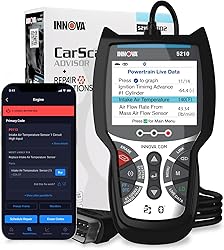
If you’re looking to dip your toes into the world of OBD2 scanning without diving into pro-level territory (or pricing), the Innova 5210 makes a solid case for itself. I’ve used this scanner with a few daily drivers, and it handled basic diagnostics like a champ. It quickly pulled check engine and ABS codes and gave me live data like RPM and fuel trims, which was more than I expected at this price point.
One bonus I particularly appreciated: the built-in battery and alternator check — handy for verifying charging issues. It also syncs with the RepairSolutions2 app via Bluetooth, offering repair advice and part suggestions. That step-by-step help through the app saved me time and confusion. However, do yourself a favor and check your vehicle’s compatibility first — ABS coverage and features vary depending on make and model.
Pros:
- Reads check engine and ABS codes
- Live data streaming is a big plus at this price
- Built-in battery and alternator test
- Pairs with a free app for repair advice
Cons:
- Not compatible with all ABS systems — check coverage
- Fewer features than higher-end models in the lineup
4. ANCEL AD310

If you’re just starting out with DIY car diagnostics or need a dependable backup scan tool that doesn’t cost an arm and a leg, the ANCEL AD310 is a solid choice. It’s not flashy, but it absolutely gets the job done where it counts: reading and clearing engine and emissions-related codes. I gave it a spin on a handful of vehicles ranging from a near-classic 2002 Hyundai to a mid-2010s Tundra, and in every case, it powered right up and delivered what I needed — no batteries, no chargers, no drama.
The interface is old-school — black and white screen, rubber buttons — but it’s intuitive enough once you get rolling. I appreciated how it offered live data (a rare perk at this price) and was surprisingly quick with both code reading and clearing. It also helped me confirm emissions readiness ahead of a smog check, which is a massive plus. Sure, you won’t find fancy features like ABS/SRS support or Auto VIN detection here, and it won’t replace your professional-grade tool, but it nails the basics — and for under $30, that’s hard to beat.
I wouldn’t call the AD310 feature-rich, but I would call it smartly built. The rugged cable and thick plastic housing feel like they were made to survive life in a messy garage. For someone who wants a plug-and-play trouble code reader that works with nearly any post-1996 OBD2-compatible vehicle, this one’s a home run.
Pros:
- Fast and accurate code reading and clearing for engine/emission issues
- No batteries required – powers directly from the vehicle
- Supports all major OBD2 protocols across a wide range of vehicles
- Includes helpful features like live data and freeze frame
Cons:
- Only covers emission-related codes – no ABS or SRS diagnostics
- Code definitions are limited – may require online lookup
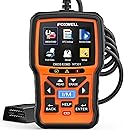
5. FOXWELL NT301

If you’re like me and prefer to do your own diagnostics rather than play the guessing game at the shop, the FOXWELL NT301 delivers where it counts—especially for the price. It’s a no-nonsense scanner that reads check engine codes, clears them when needed, and shows live data in a format that’s actually useful. The plug-and-play design means it’s ready to roll as soon as you connect it, no need to download drivers or fuss with updates beforehand.
What stood out for me was the live data functionality. Being able to track real-time metrics like engine RPM, fuel system status, and coolant temperature can make all the difference when you’re hunting down an intermittent issue. It also includes a handy I/M readiness check with color-coded LED indicators, which makes smog test prep quick and easy. Let’s be clear—this scanner doesn’t read ABS, SRS, or other advanced modules, but it nails the basics for engine diagnostics.
The only weak spots? The data logging is quite limited in scope—only short duration storage—and accessing the recorded data feels a bit clunky. The included software isn’t winning any awards either. But for a basic scanner with reliable engine diagnostics and real-time insights, it punches above its weight.
Pros:
- Accurately reads and clears engine codes
- Live data graphing is great for DIY troubleshooting
- Easy to use with plug-and-play setup
- I/M readiness LEDs helpful for quick smog checks
Cons:
- No support for ABS, SRS, or other non-OBDII systems
- Data logging and export features are clunky and limited
6. OBDLink MX+

The OBDLink MX+ is the enthusiast’s answer in this lineup — a Bluetooth adapter rather than a handheld, and the reason to pick it is one most buyers never think to check: it reads networks the others physically can’t. Alongside the five standard OBD2 protocols, it supports MS-CAN and SW-CAN — the proprietary Ford and GM buses where a great deal of the interesting data actually lives. That’s what unlocks body modules, transmission detail and enhanced ABS/SRS/TPMS access on those makes, and it’s why a Ford owner running FORScan will tell you there’s no substitute.
The other thing you notice immediately is throughput. It samples several times faster than typical adapters, which stops being an abstract number the moment you’re graphing four parameters at once and watching for a fault that only appears under load. Cheap dongles stutter and drop points over Bluetooth; this one doesn’t. It’s also built to stay in the port permanently without flattening your battery, which a handheld scanner will never do for you.
It’s not the pick for everyone. It costs several times what a basic code reader does, and if you only ever want to know why the check engine light is on, that money is wasted. The housing also sits slightly loose in some ports — on a rough test drive it’s been enough to interrupt a logging run.
Pros:
- Reads Ford MS-CAN and GM SW-CAN networks most adapters can’t
- Enhanced OEM data on supported vehicles
- Far higher data throughput than typical adapters
- No subscription fees
Cons:
- Overkill and overpriced if you only need engine codes
- Loose fit in some OBD2 ports
7. Autel AL319

If you’ve ever driven around with your check engine light on, frustrated and slightly panicked, you’re not alone—I’ve been there. That’s why the Autel AL319 impressed me right out of the box. It’s a plug-and-play tool designed to take the guesswork out of diagnostics, and for its price, it punches well above its weight. I plugged it into a few different vehicles and within seconds had quick readouts and clear diagnostic codes I could research on my own. No app downloads, no subscriptions, and no hassle.
The compact design makes it glove box-friendly, and despite its size, the scanner gives you live data, freeze frame info, and even I/M readiness readings. What’s especially handy is the one-click I/M feature—it lights up indicators and even beeps to let you know when tests pass. It doesn’t cover ABS or SRS systems, which is worth noting, but for engine and emissions diagnostics, it’s a winner. For anyone doing quick maintenance checks or getting a smog test, it’s an easy tool to recommend.
Pros:
- Very affordable with no hidden costs or subscriptions
- Simple interface and easy to use right out of the box
- Live data and freeze frame readings for better insight
- Compact and durable design, great for glove box storage
Cons:
- Doesn’t support ABS or airbag code reading
- No carrying case included
Professional vs DIY Requirements
If you’re just checking codes on your daily driver, you don’t need the same firepower I use in my shop. Basic code reading, live data, and the ability to perform emissions readiness tests will handle 90% of what most car owners encounter. However, if you’re serious about DIY repairs or work on multiple vehicles, stepping up to a mid-range scanner with enhanced manufacturer coverage makes sense.
Professional mechanics need bidirectional controls, advanced diagnostic functions, and the ability to handle everything from a 1996 Civic to a 2024 Tesla. The difference between a $100 DIY scanner and a $500 professional unit often comes down to speed, depth of coverage, and reliability under daily use. I’ve burned through three cheap scanners in the time my main professional unit has been running strong for five years. If you run a shop or work on cars professionally, check out my dedicated guide to the best professional OBD2 scanners built for daily commercial use.
Update Support and Longevity
Here’s something most people don’t think about until it’s too late — software updates. Cars get more complex every year, and manufacturers constantly change their diagnostic protocols. A scanner that can’t be updated is essentially a ticking time bomb that’ll become obsolete faster than you think.
Look for manufacturers that provide regular updates and have been in the business long enough to prove they’re not going anywhere. I’ve seen too many people stuck with expensive paperweights because the company went out of business or stopped supporting older models. Some updates are free for life, others require annual subscriptions — factor this into your total cost of ownership because you’ll definitely need updates over the scanner’s lifespan.